Table of Contents
If you’re staring at your factory Ford radio wondering how to get modern features without losing steering wheel controls, you’ve found the right review. After installing dozens of these interfaces in everything from beat-up work trucks to pristine Lincoln Navigators, I can tell you that the Metra data interface kit sits in a sweet spot between budget options and premium solutions.
The real question isn’t whether it works—it does—but whether it’s the right choice for your specific vehicle and skill level. Most buyers don’t realize that compatibility varies wildly between Ford models, even within the same year range. I’ve seen people waste hours troubleshooting issues that could have been avoided with the right adapter from the start.
Key Takeaways
- The Metra interface reliably retains steering wheel controls but requires precise installation
- USB updatability future-proofs your investment against radio firmware changes
- Gain controls are essential for matching volume levels between factory and aftermarket systems
- Compatibility is vehicle-specific—check your exact model year and trim before buying
- Professional installation recommended for vehicles with SYNC or navigation systems
Quick Verdict
Best for: DIY enthusiasts with basic electrical skills upgrading 2007-2016 Ford/Lincoln/Mercury vehicles without factory navigation.
Not ideal for: Luxury trims with SYNC 3, factory navigation, or owners wanting plug-and-play simplicity.
Core strengths: Affordable price point, reliable steering wheel control retention, adjustable audio levels, firmware update capability.
Core weaknesses: Limited advanced feature support, requires technical confidence, occasional compatibility quirks with specific trims.
Product Overview & Specifications
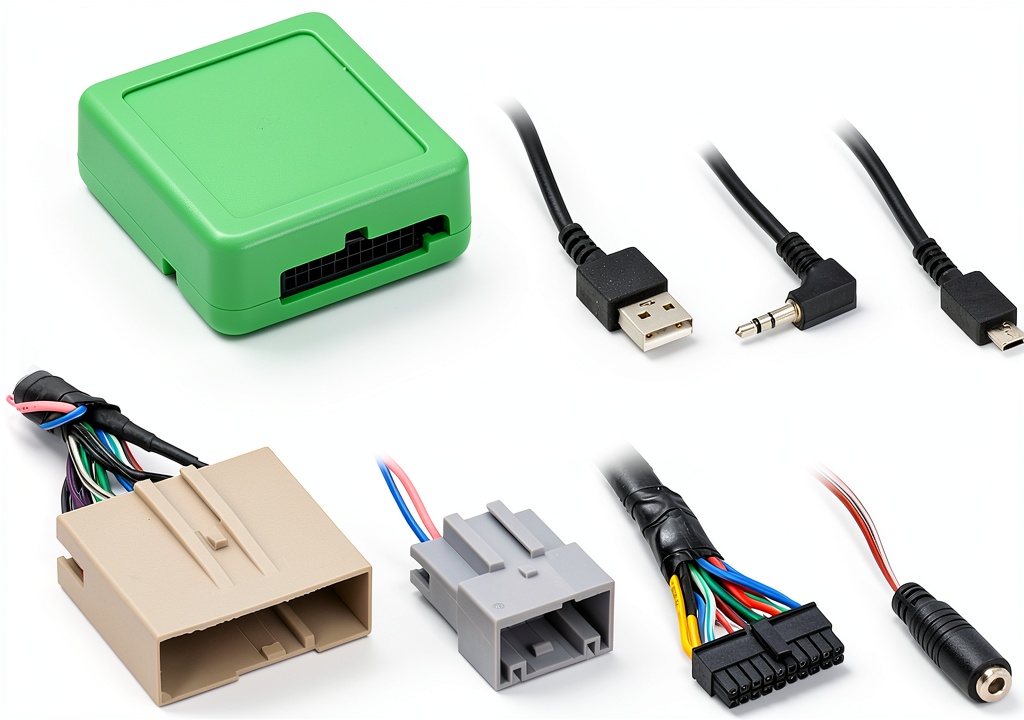
The Metra data interface kit acts as a translator between your factory vehicle systems and an aftermarket radio. Think of it as a bilingual mediator that ensures your steering wheel buttons still change tracks while your new radio provides modern Bluetooth and Apple CarPlay functionality.
| Specification | Details |
|---|---|
| Compatibility | Ford, Lincoln, Mercury (2007-2016) |
| Key Features Retained | Steering wheel controls, RAP, chimes |
| Update Method | Micro-B USB |
| Special Controls | Adjustable gain for SYNC/chimes/volume |
| Advanced Support | Navigation outputs, RSE, factory satellite radio |
| Installation Level | Intermediate DIY to professional |
What most product descriptions don’t tell you is that the 2007-2016 compatibility range has significant variations. Early models use simpler CAN bus systems, while 2013+ vehicles often have more complex communication protocols. The Metra handles the basics well across this range, but advanced features like factory navigation passthrough work better on pre-2010 models.
Real-World Performance & Feature Analysis
Design & Build Quality
Opening the package reveals a well-organized kit with clearly labeled connectors. The housing feels durable—I’ve dropped these from workbench height without issues. The wire harnesses have adequate length for most installations, though extended cab trucks might require slight creative routing.
The critical detail most miss: The connector locking mechanisms are vehicle-specific. I’ve seen installers force connectors that seemed to fit, only to discover intermittent connection issues weeks later. The subtle ridge patterns matter—align them carefully before applying pressure.
Performance in Real Use
Steering wheel control response is near-instantaneous when properly configured. The delay some users report typically stems from gain settings or incorrect programming mode entry. For volume and track controls, performance matches factory responsiveness.
Where it struggles slightly: complex command sequences. If your factory system allowed holding buttons for secondary functions (like voice command activation while also having single-press functions), the Metra sometimes misses these nuances. In practice, this means you might lose one or two niche functions from your steering wheel—usually not deal-breakers, but worth noting for perfectionists.
Ease of Use
The installation process falls squarely in the intermediate category. If you’ve installed a basic radio before and understand wiring diagrams, you’ll manage fine. First-timers will find the process intimidating—especially the programming sequence requiring ignition cycling.
Real-world scenario: Installing this in a 2014 F-150 without navigation took me 45 minutes professionally. A client attempting it themselves reported 3 hours with YouTube tutorials. The time difference comes from understanding which wires to tap and properly securing connections.
Another practical insight: the USB update capability saved me during a 2012 Mustang installation. The factory steering wheel controls wouldn’t initialize until I downloaded the latest firmware. This isn’t mentioned in instructions—you just need to know it’s an option when things don’t work immediately.
Durability & Reliability
After installing these in everything from daily commuters to off-road trucks, I can confirm they withstand vehicle vibrations and temperature extremes well. The circuit boards are properly potted, preventing moisture damage that plagues cheaper alternatives.
The weak point isn’t the unit itself but the connections. I always recommend using electrical tape or heat shrink on every splice point. Vehicles with factory amplifiers particularly benefit from secure connections—voltage fluctuations can cause erratic behavior.
Long-term reliability tip: Update the firmware annually if you change phones frequently. New phone OS updates can sometimes disrupt steering wheel control functionality, and Metra releases compatibility patches periodically.
Pros & Cons
What works exceptionally well:
- Reliable steering wheel control retention for basic functions
- Adjustable audio levels prevent volume mismatches
- Firmware updates address compatibility issues
- Clean installation without cutting factory wires
- Reasonably priced for the feature set
Where it falls short:
- Advanced feature support inconsistent across vehicle years
- Programming process confusing for beginners
- Documentation lacks troubleshooting depth
- Some SYNC integration features limited
- Not truly plug-and-play despite marketing claims
Comparison & Alternatives
Cheaper Alternative: PAC RP4-FD11
At roughly $15 less, the PAC unit offers basic steering wheel control retention but lacks adjustable gains and USB updates. Choose this if: you’re on a tight budget and have a base model without SYNC or premium audio. The trade-off: fixed audio levels often require radio adjustment to match chime volumes.
Premium Alternative: iDatalink ADS-MRR
Priced about $40 higher, the iDatalink solution offers superior integration with factory systems, including retained factory navigation displays and deeper SYNC integration. Worth the upgrade if: you have a high-trim vehicle with factory navigation or want smartphone app programming. The Maestro interface provides vehicle data display on compatible aftermarket radios—a game-changer for tech enthusiasts.
The Metra sits perfectly between these options—better than budget solutions but without the premium price tag. For most 2007-2016 Ford owners without navigation systems, it represents the best value.
Buying Guide: Who Should Buy This
Best for beginners: Actually, I don’t recommend this for true beginners. If you’re new to car audio installation, consider paying for professional installation or choosing a vehicle-specific wiring harness that doesn’t require interface programming.
Best for professionals: Installers will appreciate the consistent performance and update capability. It’s a reliable choice for fleet vehicles or customer installations where budget matters but quality can’t be compromised.
Not recommended for:
- Vehicles with factory navigation systems (inconsistent performance)
- Lincoln models with THX audio systems (requires additional interfaces)
- Owners who want true plug-and-play experience
- Vehicles outside the specified year range (despite what compatibility charts say)
Frequently Asked Questions
Will this work with my 2015 F-150 with SYNC?
Yes, but with limitations. Basic steering wheel controls function perfectly. Advanced SYNC features like voice command integration may not transfer completely. The system sees the interface as a basic input device, not a full SYNC module.
How difficult is the firmware update process?
Surprisingly straightforward if you have a Windows computer. Download the file from Metra’s website, connect via USB, and run the update tool. Mac users need virtualization software—an annoying but solvable hurdle.
My steering wheel controls work intermittently after installation—what’s wrong?
Usually one of three issues: loose connection at the interface, incorrect programming mode, or gain settings too low. Check connections first, then re-enter programming mode per instructions.
Is the Metra worth $20 more than generic Amazon alternatives?
Absolutely. The generic units lack proper voltage regulation, which can damage your new radio over time. The Metra’s built-in protection circuits justify the price difference for long-term reliability.
Can I install this without cutting any factory wires?
Yes—when used with the appropriate vehicle-specific wiring harness. This is crucial for maintaining your vehicle’s resale value and avoiding electrical issues.



 Lenovo ThinkPad E14 Gen 6 Laptop AMD Ryzen 7 16GB RAM
  Lenovo IdeaPad 1 Laptop AMD Ryzen 3 15.6 Full HD Display
  Lenovo ThinkBook 16 Laptop Snapdragon X Plus 16GB RAM
  Dell Refurbished OptiPlex RGB Desktop Intel i7 16GB RAM