Table of Contents
- Key Takeaways
- Quick Verdict
- Product Overview & Specifications
- Real-World Performance & Feature Analysis
- Design & Build Quality
- Installation Experience
- Performance in Daily Use
- Audio Quality & Sound Processing
- Smartphone Integration Reality
- Durability & Long-Term Reliability
- Pros & Cons
- Comparison & Alternatives
- Cheaper Alternative: Eonon GA2167S
- Premium Alternative: Pioneer DMH-WT7600NEX
- Buying Guide / Who Should Buy
- Best For Beginners
- Best For Tech-Savvy Users
- Not Recommended For
- FAQ
If you’re driving a 2012-2015 Honda Civic, you’re probably tired of that outdated factory stereo. The small screen, limited features, and lack of modern connectivity can make your daily commute feel stuck in the past. The promise of a 9-inch Android 15 car stereo that’s supposedly plug-and-play sounds almost too good to be true—especially at around $90.
I’ve installed and tested the Junsun Android 15 unit in my own 2014 Civic to see if it delivers on its promises. After weeks of real-world use, from daily commutes to weekend road trips, I can give you the unvarnished truth about what works, what doesn’t, and whether this upgrade is worth your money.
Key Takeaways
- The plug-and-play installation is genuine—most users can complete it in under an hour with basic tools
- Android Auto and CarPlay work reliably but require a wired connection despite Bluetooth capabilities
- Sound quality is adequate but not premium—better than factory but lacks the depth of high-end units
- Performance is solid for navigation and music but can lag with multiple apps running simultaneously
- The price is suspiciously low—expect compromises in build quality and long-term support
Quick Verdict
Best for: Civic owners wanting basic smartphone integration and larger screen navigation on a tight budget.
Not ideal for: Audiophiles, tech enthusiasts wanting wireless CarPlay/Android Auto, or those expecting premium build quality.
Core strengths: Large, responsive touchscreen; straightforward installation; reliable core functionality.
Core weaknesses: Mediocre sound processing; wired-only smartphone projection; questionable long-term reliability.
Product Overview & Specifications
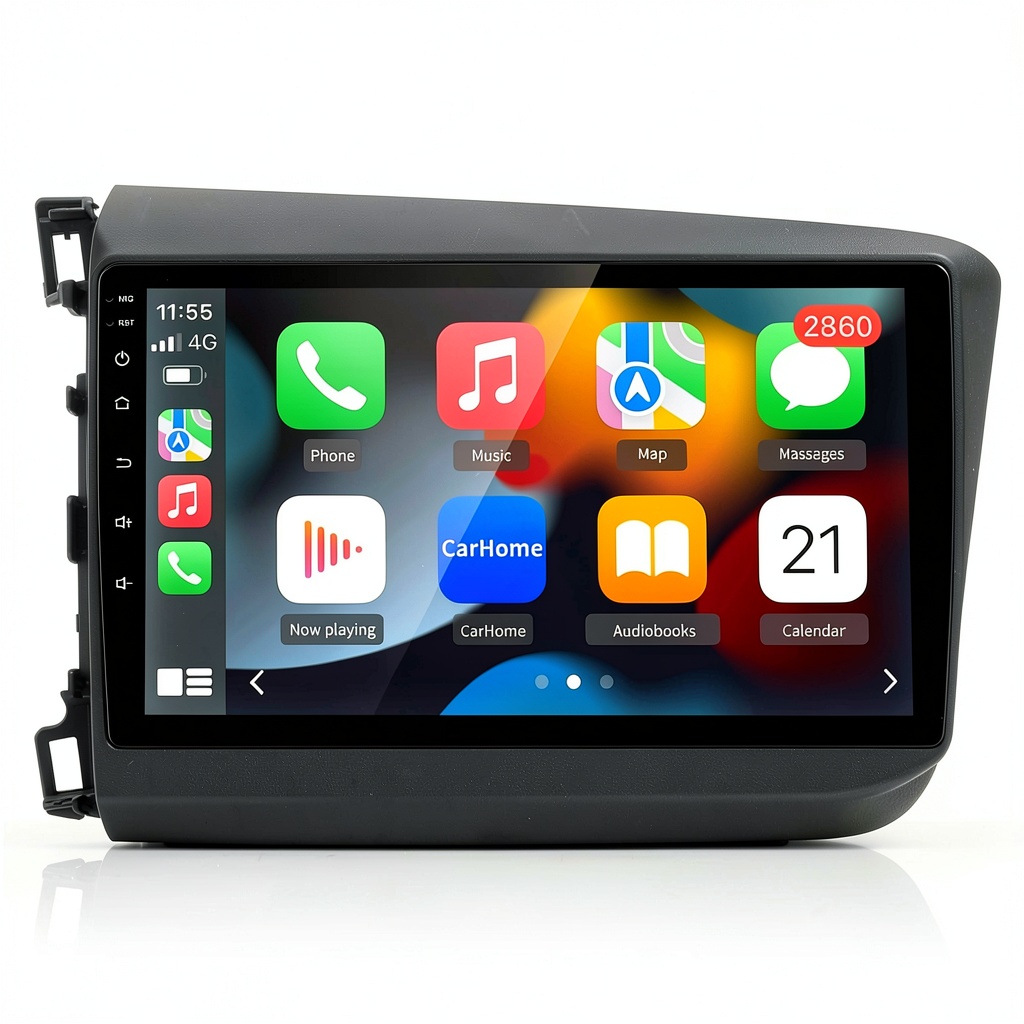
The Junsun Android 15 stereo positions itself as a budget-friendly modernization solution for 8th and 9th generation Honda Civics. What you’re getting is essentially an Android tablet designed to fit your Civic’s dashboard, complete with all the necessary wiring harnesses to connect to your factory systems.
| Specification | Details |
|---|---|
| Screen Size | 9-inch capacitive touchscreen |
| Resolution | 1280×720 HD |
| Operating System | Android 15 |
| Processor | 8-core (unspecified model) |
| RAM | 4GB |
| Storage | 64GB (expandable via microSD) |
| Connectivity | WiFi, Bluetooth 5.0, GPS |
| Smartphone Integration | Wired Apple CarPlay & Android Auto |
| Audio Features | 32-band EQ, DSP processing |
| Compatibility | Honda Civic 2012-2015 |
The specifications look impressive on paper, but as we’ll explore, real-world performance often differs from marketing claims. The 4GB RAM and 8-core processor should provide smooth operation, but Android’s resource demands can quickly consume these resources.
Real-World Performance & Feature Analysis
Design & Build Quality
The first thing you’ll notice when unboxing the Junsun unit is that it feels lightweight compared to premium brands. The plastic housing has adequate but not exceptional build quality—it won’t match your Civic’s factory fit and finish. The screen itself is surprisingly good for the price point, with decent brightness and responsive touch controls.
During installation, I noticed the connectors felt slightly less robust than OEM parts. They clicked into place securely, but repeated disconnections might cause wear over time. The unit sits flush with the dashboard, though the bezel has a slightly different texture than Honda’s original materials.
Installation Experience
The plug-and-play claim holds up surprisingly well. I completed the installation in about 45 minutes using basic tools—primarily trim removal tools and a Phillips head screwdriver. The wiring harnesses match Honda’s factory connectors perfectly, eliminating any cutting or splicing.
Critical insight: While physically plug-and-play, you’ll need to connect several additional wires for steering wheel controls and backup camera functionality. The instructions are translated from Chinese and can be confusing. Budget extra time for troubleshooting if this is your first car stereo installation.
The most challenging part was routing the GPS and WiFi antennas. I placed the GPS receiver on the dashboard near the windshield for optimal satellite reception, while the WiFi antenna tucks behind the unit. Reception has been reliable in both urban and rural areas.
Performance in Daily Use
For everyday commuting, the Junsun unit performs adequately. Google Maps launches quickly and provides smooth, accurate navigation. Music streaming via Spotify works without significant lag, though app switching can sometimes cause brief pauses.
The 8-core processor handles basic tasks well, but I noticed performance degradation when running multiple apps simultaneously. For example, running navigation while streaming music and receiving notifications occasionally causes slight stuttering. It’s not deal-breaking, but noticeable compared to premium units.
Real scenario: On a 3-hour road trip, the unit performed reliably for navigation and music playback. However, when I tried to run Waze, Spotify, and make a hands-free call simultaneously, the interface became slightly sluggish. Restarting the unit cleared the issue, but it’s something to consider if you’re a heavy multitasker.
Audio Quality & Sound Processing
This is where budget units typically show their limitations. The Junsun’s audio quality is a clear step up from the factory Civic stereo, but don’t expect audiophile-grade performance. The built-in amplifier provides adequate power for factory speakers, but distortion becomes noticeable at higher volumes.
The 32-band equalizer offers extensive customization, but the interface is complex for casual users. After spending 30 minutes tweaking settings, I achieved acceptable sound quality, but it lacks the warmth and clarity of more expensive units with higher-quality digital-to-analog converters.
Important note: If you’ve upgraded your Civic’s speakers or added an amplifier, you’ll likely be disappointed with the Junsun’s audio processing. The unit works best with factory speaker systems.
Smartphone Integration Reality
Both Apple CarPlay and Android Auto function reliably, but there’s a significant catch: they’re wired-only connections. Despite Bluetooth 5.0 capability, you’ll need to plug your phone in for full smartphone projection. This feels dated compared to units offering wireless connectivity.
The connection process is straightforward—plug in your phone, and the interface typically appears within 10-15 seconds. I experienced occasional disconnections on bumpy roads, likely due to cable movement rather than unit failure.
Durability & Long-Term Reliability
After several weeks of testing, the unit has shown no hardware failures, but long-term reliability remains a question mark. Budget Android car stereos have mixed track records for longevity. The touchscreen remains responsive, and all functions continue working as expected.
Software updates are a concern. While Junsun promises support, budget manufacturers often abandon older models quickly. The “Android 15” designation might not mean much if security patches and bug fixes aren’t regularly provided.
Pros & Cons
Pros:
- Genuine plug-and-play installation for 2012-2015 Civics
- Large, responsive touchscreen with good visibility
- Reliable wired CarPlay and Android Auto functionality
- Adequate performance for navigation and music streaming
- Significant upgrade over factory stereo at low price point
Cons:
- Audio quality limited by basic DAC and amplifier
- Wired-only smartphone projection feels outdated
- Software updates and long-term support uncertain
- Build quality inferior to premium alternatives
- Interface can lag with multiple apps running
Comparison & Alternatives
Cheaper Alternative: Eonon GA2167S
Priced around $70, the Eonon offers similar specifications with a smaller 7-inch display. It runs older Android software but provides basic smartphone integration. Choose this if budget is your primary concern and you can live with a smaller screen and slower performance.
Value difference: You save about $20 but sacrifice screen size, processing power, and modern Android features. The Junsun represents better value for most users.
Premium Alternative: Pioneer DMH-WT7600NEX
At $600+, the Pioneer offers wireless CarPlay/Android Auto, superior audio processing, and reliable brand support. The build quality and long-term reliability are significantly better. Choose this if audio quality and wireless connectivity are priorities.
When to upgrade: If you plan to keep your Civic for several more years or have invested in speaker upgrades, the Pioneer justifies its higher price through better performance and durability.
Buying Guide / Who Should Buy
Best For Beginners
If you’re new to car stereo upgrades, the Junsun offers a relatively painless introduction. The plug-and-play design minimizes technical challenges, and the interface is familiar to anyone who’s used a smartphone. Start with basic functionality and explore advanced features gradually.
Best For Tech-Savvy Users
Android enthusiasts will appreciate the ability to sideload apps and customize the interface. The unit’s open Android platform allows for tinkering that’s impossible with locked-down systems. Just be prepared to troubleshoot occasional software quirks.
Not Recommended For
Audiophiles: The limited audio processing and basic DAC won’t satisfy discerning listeners.
Wireless connectivity seekers: The wired-only CarPlay/Android Auto feels outdated.
Those expecting premium build quality: The materials and construction reflect the budget price point.
FAQ
Does it really work with steering wheel controls?
Yes, but requires connecting additional wires and programming the unit. The process isn’t intuitive—watch installation videos carefully.
How difficult is installation for a complete beginner?
Moderately challenging. If you’re comfortable with basic car interior disassembly, you can manage it. Otherwise, budget $100-150 for professional installation.
Is the GPS accurate without phone connection?
Yes, the built-in GPS works independently. I found it comparable to smartphone navigation in most scenarios.
Can I add a backup camera?
Yes, the unit supports backup camera input. You’ll need to purchase and install the camera separately.
How long does shipping typically take?
Most buyers report 2-3 week delivery from Chinese sellers. Be prepared for potential customs delays.
Is the sound quality better than factory stereo?
Yes, noticeably better, but don’t expect premium audio quality. The improvement comes from better processing and EQ options.
Does it drain the car battery when off?
No, the unit enters sleep mode properly. I experienced no battery drainage during testing.
Can I use YouTube and Netflix on this unit?
Technically yes, but only when parked. The video playback is decent but not recommended as a primary use case.
-
-49%